/**
 * Google Workspace User Updater from Google Sheets
 *
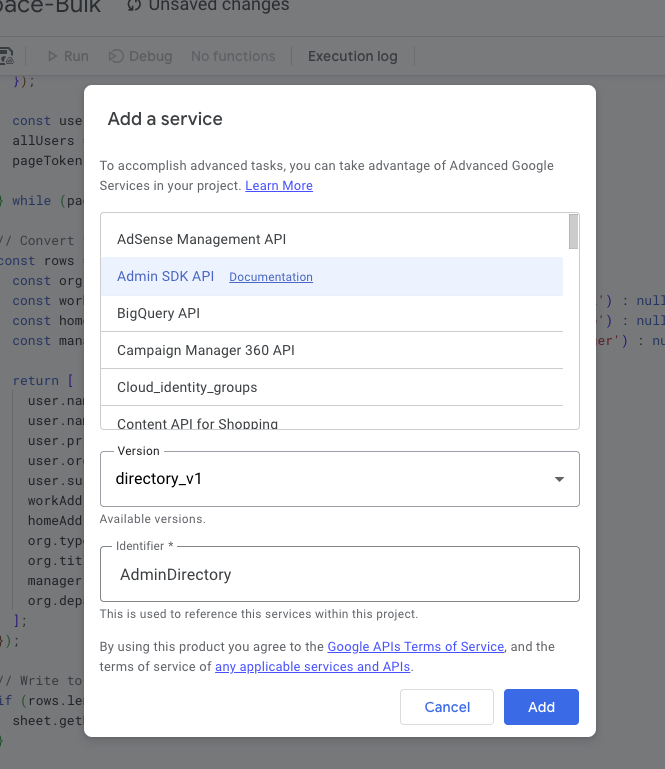
 * Required OAuth Scopes (automatically added when you use AdminDirectory):
 * - https://www.googleapis.com/auth/admin.directory.user
 *
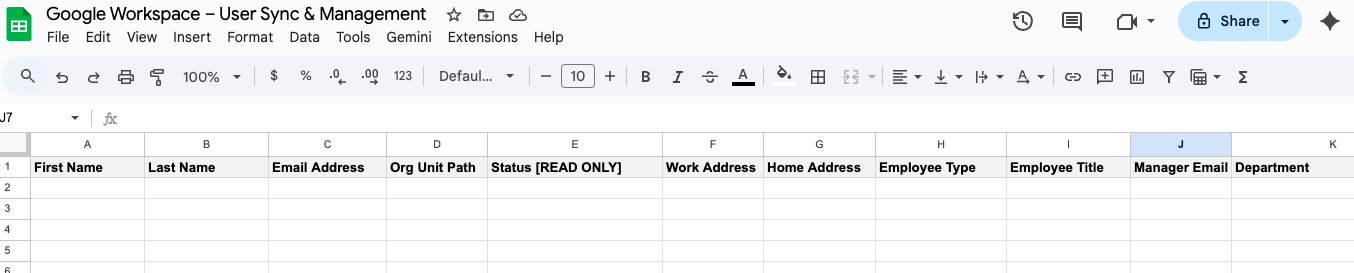
 * Sheet Format (Row 1 should have headers):
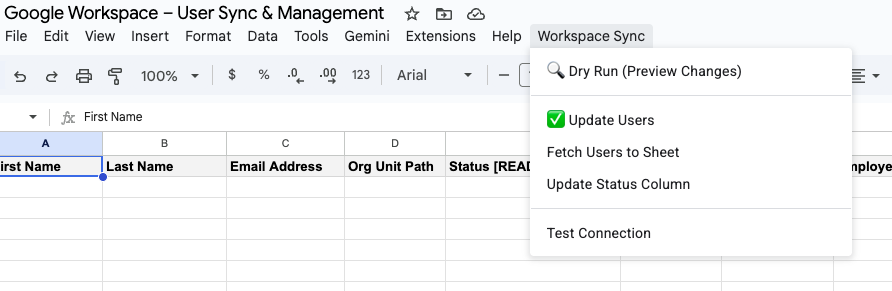
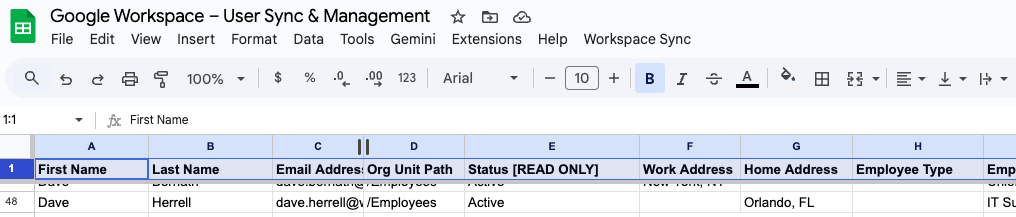
 * First Name | Last Name | Email Address | Org Unit Path | Status [READ ONLY] | Work Address | Home Address | Employee Type | Employee Title | Manager Email | Department
 */

function onOpen() {
  const ui = SpreadsheetApp.getUi();
  ui.createMenu('Workspace Sync')
    .addItem('🔍 Dry Run (Preview Changes)', 'dryRunUsers')
    .addSeparator()
    .addItem('✅ Update Users', 'updateWorkspaceUsers')
    .addItem('Fetch Users to Sheet', 'fetchUsersToSheet')
    .addItem('Update Status Column', 'updateStatusColumn')
    .addSeparator()
    .addItem('Test Connection', 'testConnection')
    .addToUi();
}

/**
 * Test if the script can connect to Admin SDK
 */
function testConnection() {
  try {
    const users = AdminDirectory.Users.list({
      domain: 'daveherrell.com', // Replace with your domain
      maxResults: 1
    });

    SpreadsheetApp.getUi().alert('Success!',
      'Connected to Admin SDK successfully.\nFound domain users.',
      SpreadsheetApp.getUi().ButtonSet.OK);
  } catch (error) {
    SpreadsheetApp.getUi().alert('Error',
      'Failed to connect: ' + error.message + '\n\nMake sure Admin SDK API is enabled.',
      SpreadsheetApp.getUi().ButtonSet.OK);
  }
}

/**
 * Dry run function - previews changes without updating
 */
function dryRunUsers() {
  processUsers(true);
}

/**
 * Main function to update Workspace users from the sheet
 */
function updateWorkspaceUsers() {
  // Show confirmation dialog
  const ui = SpreadsheetApp.getUi();
  const response = ui.alert('Confirm Update',
    'This will update users in Google Workspace. Run a Dry Run first to preview changes.\n\nContinue with update?',
    ui.ButtonSet.YES_NO);

  if (response !== ui.Button.YES) {
    return;
  }

  processUsers(false);
}

/**
 * Core processing function that handles both dry run and actual updates
 * @param {boolean} isDryRun - If true, only preview changes without updating
 */
function processUsers(isDryRun) {
  const sheet = SpreadsheetApp.getActiveSpreadsheet().getActiveSheet();
  const data = sheet.getDataRange().getValues();

  // Skip header row
  const headers = data[0];
  const users = data.slice(1);

  // Find column indices
  const colIndices = {
    firstName: headers.indexOf('First Name'),
    lastName: headers.indexOf('Last Name'),
    email: headers.indexOf('Email Address'),
    orgUnitPath: headers.indexOf('Org Unit Path'),
    status: headers.indexOf('Status [READ ONLY]'),
    workAddress: headers.indexOf('Work Address'),
    homeAddress: headers.indexOf('Home Address'),
    employeeType: headers.indexOf('Employee Type'),
    employeeTitle: headers.indexOf('Employee Title'),
    managerEmail: headers.indexOf('Manager Email'),
    department: headers.indexOf('Department')
  };

  // Validate required columns
  if (colIndices.firstName === -1 || colIndices.lastName === -1 || colIndices.email === -1) {
    SpreadsheetApp.getUi().alert('Error',
      'Required columns missing: First Name, Last Name, and Email Address must be present.',
      SpreadsheetApp.getUi().ButtonSet.OK);
    return;
  }

  let successCount = 0;
  let errorCount = 0;
  const errors = [];
  const statusUpdates = [];
  const changes = []; // Track changes for dry run

  // Process each user
  users.forEach((row, index) => {
    const email = row[colIndices.email];

    // Skip empty rows
    if (!email || email.toString().trim() === '') {
      return;
    }

    try {
      // Get current user data to compare changes
      let currentUser;
      try {
        currentUser = AdminDirectory.Users.get(email);
      } catch (e) {
        throw new Error('User not found in Workspace');
      }

      // Build user object with updates
      const userUpdate = {
        name: {
          givenName: row[colIndices.firstName],
          familyName: row[colIndices.lastName]
        }
      };

      // Track what will change
      const userChanges = [];

      // Check name changes
      if (currentUser.name.givenName !== row[colIndices.firstName]) {
        userChanges.push(`First Name: "${currentUser.name.givenName}" → "${row[colIndices.firstName]}"`);
      }
      if (currentUser.name.familyName !== row[colIndices.lastName]) {
        userChanges.push(`Last Name: "${currentUser.name.familyName}" → "${row[colIndices.lastName]}"`);
      }

      // Add Org Unit Path if provided
      if (colIndices.orgUnitPath !== -1 && row[colIndices.orgUnitPath]) {
        userUpdate.orgUnitPath = row[colIndices.orgUnitPath];
        if (currentUser.orgUnitPath !== row[colIndices.orgUnitPath]) {
          userChanges.push(`Org Unit: "${currentUser.orgUnitPath}" → "${row[colIndices.orgUnitPath]}"`);
        }
      }

      // Add optional fields if they exist and have values
      if (colIndices.employeeTitle !== -1 && row[colIndices.employeeTitle]) {
        userUpdate.organizations = [{
          title: row[colIndices.employeeTitle],
          primary: true,
          customType: '',
          department: colIndices.department !== -1 && row[colIndices.department] ? row[colIndices.department] : undefined
        }];
      } else if (colIndices.department !== -1 && row[colIndices.department]) {
        userUpdate.organizations = [{
          department: row[colIndices.department],
          primary: true
        }];
      }

      // Check organization changes
      const currentOrg = currentUser.organizations ? currentUser.organizations[0] : {};
      if (colIndices.employeeTitle !== -1 && row[colIndices.employeeTitle]) {
        if (currentOrg.title !== row[colIndices.employeeTitle]) {
          userChanges.push(`Title: "${currentOrg.title || ''}" → "${row[colIndices.employeeTitle]}"`);
        }
      }
      if (colIndices.department !== -1 && row[colIndices.department]) {
        if (currentOrg.department !== row[colIndices.department]) {
          userChanges.push(`Department: "${currentOrg.department || ''}" → "${row[colIndices.department]}"`);
        }
      }

      // Add employee type to organizations if provided
      if (colIndices.employeeType !== -1 && row[colIndices.employeeType]) {
        userUpdate.organizations = userUpdate.organizations || [{ primary: true }];
        userUpdate.organizations[0].type = row[colIndices.employeeType];
        if (currentOrg.type !== row[colIndices.employeeType]) {
          userChanges.push(`Employee Type: "${currentOrg.type || ''}" → "${row[colIndices.employeeType]}"`);
        }
      }

      // Add addresses
      const addresses = [];
      if (colIndices.workAddress !== -1 && row[colIndices.workAddress]) {
        addresses.push({
          type: 'work',
          formatted: row[colIndices.workAddress],
          primary: true
        });
      }
      if (colIndices.homeAddress !== -1 && row[colIndices.homeAddress]) {
        addresses.push({
          type: 'home',
          formatted: row[colIndices.homeAddress]
        });
      }
      if (addresses.length > 0) {
        userUpdate.addresses = addresses;

        // Check address changes
        const currentWorkAddr = currentUser.addresses ? currentUser.addresses.find(a => a.type === 'work') : null;
        const currentHomeAddr = currentUser.addresses ? currentUser.addresses.find(a => a.type === 'home') : null;

        if (colIndices.workAddress !== -1 && row[colIndices.workAddress]) {
          const currentWork = currentWorkAddr ? currentWorkAddr.formatted : '';
          if (currentWork !== row[colIndices.workAddress]) {
            userChanges.push(`Work Address: "${currentWork}" → "${row[colIndices.workAddress]}"`);
          }
        }
        if (colIndices.homeAddress !== -1 && row[colIndices.homeAddress]) {
          const currentHome = currentHomeAddr ? currentHomeAddr.formatted : '';
          if (currentHome !== row[colIndices.homeAddress]) {
            userChanges.push(`Home Address: "${currentHome}" → "${row[colIndices.homeAddress]}"`);
          }
        }
      }

      // Add relations (manager)
      if (colIndices.managerEmail !== -1 && row[colIndices.managerEmail]) {
        userUpdate.relations = [{
          type: 'manager',
          value: row[colIndices.managerEmail]
        }];

        // Check manager changes
        const currentManager = currentUser.relations ? currentUser.relations.find(r => r.type === 'manager') : null;
        const currentManagerEmail = currentManager ? currentManager.value : '';
        if (currentManagerEmail !== row[colIndices.managerEmail]) {
          userChanges.push(`Manager: "${currentManagerEmail}" → "${row[colIndices.managerEmail]}"`);
        }
      }

      // Only update if there are actual changes
      if (userChanges.length > 0) {
        changes.push({
          row: index + 2,
          email: email,
          changes: userChanges
        });

        // Only perform actual update if not dry run
        if (!isDryRun) {
          const updatedUser = AdminDirectory.Users.update(userUpdate, email);

          // Collect status for updating (if status column exists)
          if (colIndices.status !== -1) {
            statusUpdates.push({
              row: index + 2,
              status: updatedUser.suspended ? 'Suspended' : 'Active'
            });
          }
        }

        successCount++;
      } else {
        // No changes needed for this user
        if (isDryRun) {
          changes.push({
            row: index + 2,
            email: email,
            changes: ['No changes needed']
          });
        }
      }

    } catch (error) {
      errorCount++;
      errors.push(`Row ${index + 2} (${email}): ${error.message}`);

      // Mark as error in status column (only for actual updates)
      if (!isDryRun && colIndices.status !== -1) {
        statusUpdates.push({
          row: index + 2,
          status: 'Error'
        });
      }
    }
  });

  // Update status column if it exists (only for actual updates, not dry run)
  if (!isDryRun && colIndices.status !== -1 && statusUpdates.length > 0) {
    statusUpdates.forEach(update => {
      sheet.getRange(update.row, colIndices.status + 1).setValue(update.status);
    });
  }

  // Show results
  let message = '';

  if (isDryRun) {
    message = `🔍 DRY RUN - Preview of Changes\n\n`;
    message += `Users to update: ${successCount}\nErrors: ${errorCount}\n`;

    if (changes.length > 0) {
      message += '\n--- CHANGES TO BE MADE ---\n\n';
      changes.slice(0, 10).forEach(change => {
        message += `Row ${change.row} - ${change.email}:\n`;
        change.changes.forEach(c => message += `  • ${c}\n`);
        message += '\n';
      });

      if (changes.length > 10) {
        message += `... and ${changes.length - 10} more users with changes.\n`;
      }

      message += '\n✅ No actual changes were made.\nRun "Update Users" to apply these changes.';
    }
  } else {
    message = `✅ Update Complete!\n\nSuccess: ${successCount}\nErrors: ${errorCount}`;
  }

  if (errors.length > 0) {
    message += '\n\n--- ERRORS ---\n' + errors.slice(0, 5).join('\n');
    if (errors.length > 5) {
      message += `\n... and ${errors.length - 5} more errors. Check logs for details.`;
    }
    console.log('All errors:', errors);
  }

  SpreadsheetApp.getUi().alert(isDryRun ? 'Dry Run Results' : 'Update Results', message, SpreadsheetApp.getUi().ButtonSet.OK);
}

/**
 * Update only the Status column for all users
 */
function updateStatusColumn() {
  const sheet = SpreadsheetApp.getActiveSpreadsheet().getActiveSheet();
  const data = sheet.getDataRange().getValues();

  const headers = data[0];
  const users = data.slice(1);

  const emailCol = headers.indexOf('Email Address');
  const statusCol = headers.indexOf('Status [READ ONLY]');

  if (emailCol === -1 || statusCol === -1) {
    SpreadsheetApp.getUi().alert('Error',
      'Email Address and Status [READ ONLY] columns must be present.',
      SpreadsheetApp.getUi().ButtonSet.OK);
    return;
  }

  let updateCount = 0;

  users.forEach((row, index) => {
    const email = row[emailCol];

    if (!email || email.toString().trim() === '') {
      return;
    }

    try {
      const user = AdminDirectory.Users.get(email);
      const status = user.suspended ? 'Suspended' : 'Active';
      sheet.getRange(index + 2, statusCol + 1).setValue(status);
      updateCount++;
    } catch (error) {
      sheet.getRange(index + 2, statusCol + 1).setValue('Not Found');
    }
  });

  SpreadsheetApp.getUi().alert('Status Update Complete',
    `Updated status for ${updateCount} users.`,
    SpreadsheetApp.getUi().ButtonSet.OK);
}

/**
 * Function to fetch current user data into the sheet
 */
function fetchUsersToSheet() {
  const sheet = SpreadsheetApp.getActiveSpreadsheet().getActiveSheet();
  const domain = 'daveherrell.com'; // Replace with your domain

  // Clear existing data (keep headers)
  const lastRow = sheet.getLastRow();
  if (lastRow > 1) {
    sheet.deleteRows(2, lastRow - 1);
  }

  // Set headers if not present
  const headers = ['First Name', 'Last Name', 'Email Address', 'Org Unit Path', 'Status [READ ONLY]',
                   'Work Address', 'Home Address', 'Employee Type', 'Employee Title', 'Manager Email', 'Department'];
  sheet.getRange(1, 1, 1, headers.length).setValues([headers]);

  // Format header row
  const headerRange = sheet.getRange(1, 1, 1, headers.length);
  headerRange.setFontWeight('bold');
  headerRange.setBackground('#f3f3f3');

  let pageToken;
  let allUsers = [];

  // Fetch all users
  do {
    const response = AdminDirectory.Users.list({
      domain: domain,
      maxResults: 500,
      pageToken: pageToken
    });

    const users = response.users || [];
    allUsers = allUsers.concat(users);
    pageToken = response.nextPageToken;

  } while (pageToken);

  // Convert to sheet rows
  const rows = allUsers.map(user => {
    const org = user.organizations ? user.organizations[0] : {};
    const workAddr = user.addresses ? user.addresses.find(a => a.type === 'work') : null;
    const homeAddr = user.addresses ? user.addresses.find(a => a.type === 'home') : null;
    const manager = user.relations ? user.relations.find(r => r.type === 'manager') : null;

    return [
      user.name.givenName || '',
      user.name.familyName || '',
      user.primaryEmail || '',
      user.orgUnitPath || '/',
      user.suspended ? 'Suspended' : 'Active',
      workAddr ? workAddr.formatted : '',
      homeAddr ? homeAddr.formatted : '',
      org.type || '',
      org.title || '',
      manager ? manager.value : '',
      org.department || ''
    ];
  });

  // Write to sheet
  if (rows.length > 0) {
    sheet.getRange(2, 1, rows.length, headers.length).setValues(rows);
  }

  SpreadsheetApp.getUi().alert('Fetch Complete',
    `Fetched ${rows.length} users from ${domain}`,
    SpreadsheetApp.getUi().ButtonSet.OK);
}